
Platform — Documents
HR Documents
Generate salary certificates, NOC letters, employment letters and contracts from smart templates. Store all employee documents securely with access control, expiry tracking and approval workflows.
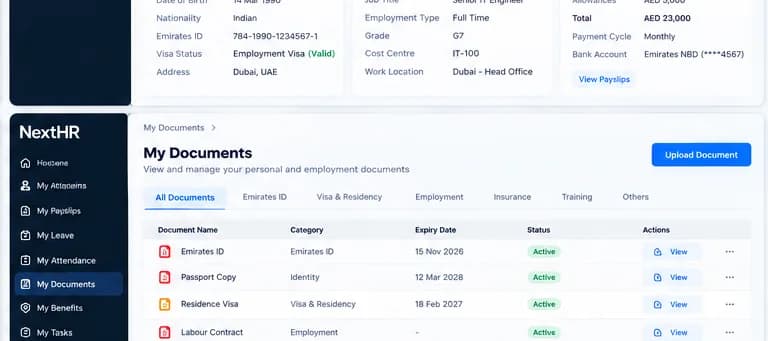
Generate compliant HR documents in seconds. Store, track and share employee documents securely.
Document Generation
Generate salary certificates, NOC letters, employment letters, experience certificates and other standard HR documents from configurable templates.
Document Templates
Customise document templates with your company branding, entity details and the exact content required by banks, embassies and government bodies.
Secure Storage
All employee documents stored securely with role-based access control. HR can access all documents; employees see only their own.
Expiry Tracking
Automatic alerts for document expiries — visa, residency permits, professional certifications and employment contract end dates.
Approval Workflows
Document requests can be routed for approval before generation and issuance — with a full audit trail of who approved each document.
Document Categories
Organise documents by category: employment documents, visa and immigration, certifications, payroll documents and custom categories.
Self-Service Access
Employees access and download their own documents via self-service — salary certificates, payslips and employment letters without contacting HR.
Document Reports
Document status dashboards, upcoming expiry reports and document request history for HR governance and compliance audits.
How it works
From document request to employee delivery
Employee or HR requests document
An employee requests a salary certificate through self-service, or HR generates an employment letter directly from the employee record.
Template selected and populated
NextHR populates the selected template with employee data — name, position, salary, employer details — from the HR record automatically.
Approval (if configured)
If approval is required, the document is routed to the authorised signatory for review and approval before issuance.
Document generated and stored
The approved document is generated as a PDF and stored in the employee's document library, linked to their HR record.
Employee notified and can download
The employee receives a notification that their document is ready and can download it from self-service.
Expiry tracked if applicable
Documents with expiry dates — visa copies, professional certificates — are tracked with automated alerts before expiry.
Key benefits
What you get with NextHR
- Instant generation of salary certificates, NOC letters and employment letters
- Smart templates customised with your company branding
- All employee documents in one secure location
- Expiry tracking for visas, permits and certifications with automated alerts
- Document approval workflow with full audit trail
- Employee self-service access to their own documents
- Document request history for governance and audit
- Integration with employee records and leave management
Built for the GCC
GCC employees regularly need formal HR letters for bank account opening, visa applications, rental agreements, loan approvals and government portal submissions. A salary certificate issued quickly and correctly is a basic expectation in the GCC employment relationship. NextHR templates are designed for this — standard GCC HR documents that your employees need, generated in seconds, with your company details applied automatically.
FAQ
Frequently asked questions
What documents can NextHR generate?
NextHR includes templates for: salary certificates, NOC (No Objection Certificate) letters, employment letters, experience certificates and termination letters. Additional custom document templates can be configured for your organisation's specific needs.
Can documents be generated in Arabic?
Document templates can be configured in English, Arabic or bilingual format depending on your template setup. Many GCC government submissions require Arabic or bilingual documents.
How does document expiry tracking work?
When you upload or create a document with an expiry date — such as a visa copy or professional certification — NextHR tracks the expiry and sends automated alerts to HR at configured intervals (e.g. 90, 60 and 30 days before expiry). You can view all upcoming expiries in the document dashboard.
Can employees download their own documents?
Yes. Employees can access their own salary certificates, payslips, employment letters and other documents via the employee self-service portal without contacting HR. Access is controlled — employees see only their own documents.
Is there an approval process before a document is issued?
Yes, approval workflows can be configured for document generation. For example, a salary certificate request may require HR manager approval before the document is issued. The approval decision and approver are recorded in the audit trail.
Related modules
Ready to get started?
Explore HR Documents as part of the complete NextHR platform.