
Platform — Self-Service
Employee Self-Service
Employees submit leave requests, view payslips, access HR documents, update personal information and track request status — without contacting HR for every routine task.
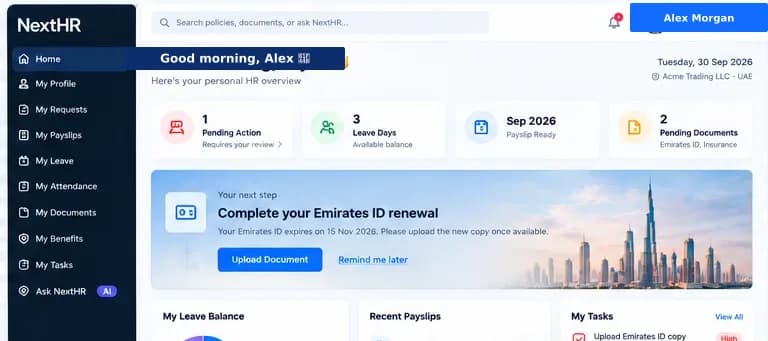
Give employees direct access to their HR. Less admin for your HR team, faster service for your workforce.
Leave Requests
Employees submit leave requests directly from self-service. Managers approve or reject with a comment. Employees track request status in real time.
Payslip Access
Employees view and download current and historical payslips at any time. No more HR requests for payslip copies.
Personal Information
Employees update their personal details, emergency contacts and bank account information. Changes flow directly to the HR record.
Document Downloads
Employees access and download their salary certificates, employment letters, NOC letters and other HR documents on demand.
Leave Balance View
Employees see their current leave balances for each leave type — annual, sick, maternity — and can plan leave requests accordingly.
Notifications
Employees receive notifications for leave approvals, payroll processing completion, document availability and other relevant HR updates.
Secure Role-Based Access
Employees see only their own information. Managers see their team's data. Role-based access control is enforced throughout.
Request Tracking
All requests — leave, document generation, information updates — are tracked with status. Employees know where their request stands without calling HR.
How it works
Typical employee self-service journey
Employee logs in
Employee accesses the self-service portal via web browser. Single sign-on (SSO) is supported for organisations using Azure AD or Google Workspace.
Views dashboard
The home screen shows leave balance, recent payslips, pending requests and any HR notifications — at a glance.
Submits a leave request
Employee selects leave type, dates and submits. The system checks leave balance and routes the request to the manager automatically.
Tracks request status
The employee can see the status of all pending requests — under review, approved, or rejected with reason — without contacting HR.
Downloads payslip
From the payslip section, the employee views and downloads their current month payslip or any historical payslip.
Requests an HR document
Employee requests a salary certificate or NOC letter. The request is sent to HR, generated from template and returned to the employee's document library.
Key benefits
What you get with NextHR
- Employees manage leave requests without contacting HR
- Payslip access and download at any time — current and historical
- Personal information self-update reduces HR data entry
- HR documents available on demand via self-service
- Leave balance visibility before submitting requests
- Real-time request tracking reduces follow-up calls to HR
- Secure with role-based access — employees see only their own data
- Reduces routine HR admin volume significantly
Built for the GCC
In GCC organisations with large, multi-nationality workforces, routine HR tasks — payslip copies, salary certificate requests, leave balance queries — can consume a significant share of the HR team's time. Employee self-service transfers these tasks to the employee directly, freeing HR to focus on strategic work. For workforces spread across sites, self-service via web browser provides consistent access without requiring physical HR presence.
FAQ
Frequently asked questions
What can employees do in self-service?
Employees can: view and download payslips; check leave balances; submit leave requests and track their status; update personal details and emergency contacts; update bank account information; and download HR documents (salary certificates, employment letters, NOC letters) that have been issued to them.
Is self-service available on mobile?
The self-service portal is web-based and responsive — it works on desktop, tablet and mobile web browsers. There is no separate mobile app requirement; employees access via the browser on any device.
Can employees update their own bank details for payroll?
Yes. Employees can update their bank account details in self-service. The change is flagged to HR for review before being applied to the next payroll run — this prevents unauthorised payroll diversions.
What happens when an employee requests a salary certificate?
The employee submits a document request via self-service, specifying the purpose (e.g. bank account opening). HR receives the request, generates the salary certificate from the template, approves it and returns it to the employee's document library. The employee is notified when it's ready to download.
Does SSO work with self-service?
Yes. NextHR supports single sign-on with Azure Active Directory and Google Workspace. Employees in organisations that use these identity providers can sign in with their existing company credentials.
Ready to get started?
Explore Employee Self-Service as part of the complete NextHR platform.