
Platform — People & HR
People & HR Management
Manage employee records, onboarding, org structures, visa expiries and nationalization targets for your entire GCC workforce — in one compliant, easy-to-use platform.
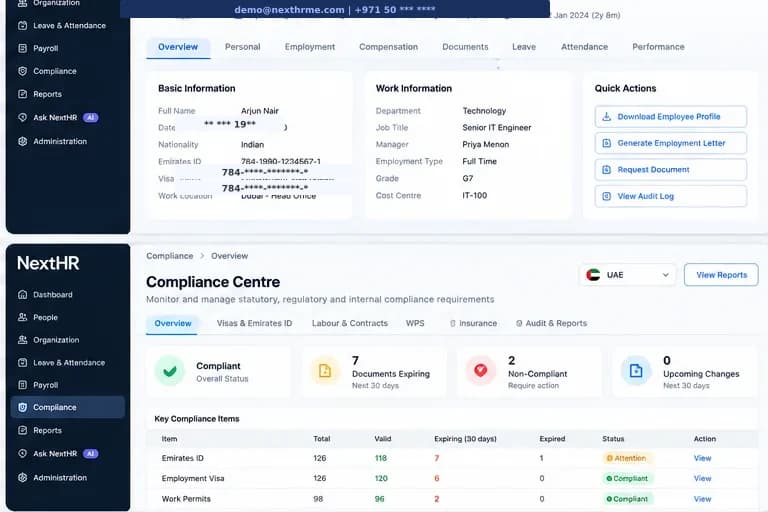
Centralise your workforce across all six GCC countries with compliant, configurable HR records.
Employee Records
Comprehensive employee profiles with personal, employment, visa, compensation and document information — structured for GCC multi-nationality workforces.
Onboarding Workflows
Structured onboarding checklists, document collection and department assignment for new hires — configurable per entity and role.
Org Charts
Visual org structure across entities and countries with reporting line management. See your entire workforce hierarchy at a glance.
Nationalization Tracking
Monitor Emiratisation (UAE), Saudisation/Nitaqat (KSA), Omanisation and other GCC national quota ratios with dedicated dashboards.
Visa & Permit Management
Track visa categories, expiry dates and renewal alerts for your entire workforce. Critical for GCC employers with large expatriate populations.
Alerts & Notifications
Automatic reminders for visa expiries, probation period endings, contract renewals and other compliance-critical deadlines.
Offboarding
Structured offboarding checklists, end-of-service gratuity calculation triggers, visa cancellation reminders and document return tracking.
Employee History
Complete employment history — job changes, promotions, salary revisions and performance notes — all linked to the employee record.
How it works
From onboarding to complete workforce oversight
Create employee profile
Add employee personal details, employment terms, visa information, nationality and job assignment. Country-specific fields appear based on the entity's GCC location.
Assign to org chart
Place the employee in the org chart with their manager and department. Reporting lines update automatically.
Onboarding checklist
Trigger an onboarding workflow — document collection, system access, orientation tasks — assigned to HR, IT and the manager.
Visa and permit tracking
Record visa type, entry permit and residency details with expiry dates. Alerts fire automatically before expiry.
Monitor nationalization
Nationalization dashboards calculate ratios in real time. View Emiratisation, Saudisation or Omanisation percentages per entity.
Manage offboarding
When an employee leaves, trigger the offboarding checklist — EOS gratuity calculation, visa cancellation reminder, document return and final payroll flag.
Key benefits
What you get with NextHR
- Single source of truth for your entire GCC workforce
- Country-specific fields and compliance built in per entity
- Visa and permit expiry tracking with automatic alerts
- Real-time nationalization ratio reporting (Emiratisation, Saudisation, Omanisation)
- Employee lifecycle from hire to offboarding
- Document management linked to each employee record
- Configurable org structure across multiple entities
- Onboarding and offboarding workflow checklists
Built for the GCC
GCC workforces are uniquely complex: multi-nationality teams across multiple countries, government nationalization quotas, visa-dependent employment and different labour laws per jurisdiction. NextHR is built for this reality — country-specific rules are configured per entity, not applied globally, so a UAE mainland entity runs differently from a Saudi Arabia entity or a Qatar free zone.
FAQ
Frequently asked questions
What is Emiratisation and does NextHR track it?
Emiratisation (Nafis programme) requires UAE mainland businesses in certain sectors to hire UAE nationals at target ratios. NextHR tracks your current Emirati headcount and calculates the ratio against your total workforce per UAE entity. Thresholds and sector requirements should be verified against current MOHRE guidance.
Can NextHR manage employees across multiple GCC entities?
Yes. NextHR is designed for multi-entity GCC businesses. Each entity is configured independently — with its own payroll, leave policies, country rules and HR settings — while HR admins can view consolidated workforce data across all entities from a single dashboard.
How does visa expiry tracking work?
When you record a visa or residency permit, you enter the expiry date. NextHR sends automated alerts to HR (and optionally the employee) a configurable number of days before expiry — typically 90, 60 and 30 days. You can see all upcoming expiries in the visa tracking dashboard.
Does NextHR support probation period management?
Yes. Probation end dates are tracked and alerts are sent to HR and the manager before the probation period expires, prompting a confirmation or extension decision. Probation periods are configured per entity based on the applicable labour law.
What documents can be stored per employee?
NextHR stores all employment documents against the employee record — employment contract, visa copies, passport copy, salary certificates, NOC letters and any custom documents. Documents are categorised, searchable and access-controlled.
Related modules
Ready to get started?
Explore People & HR Management as part of the complete NextHR platform.