
Platform — Payroll
GCC Payroll Processing
Multi-country payroll for the GCC — with WPS SIF generation for UAE, GOSI contributions for Saudi Arabia, end-of-service gratuity, multi-currency and approval workflows handled per entity.
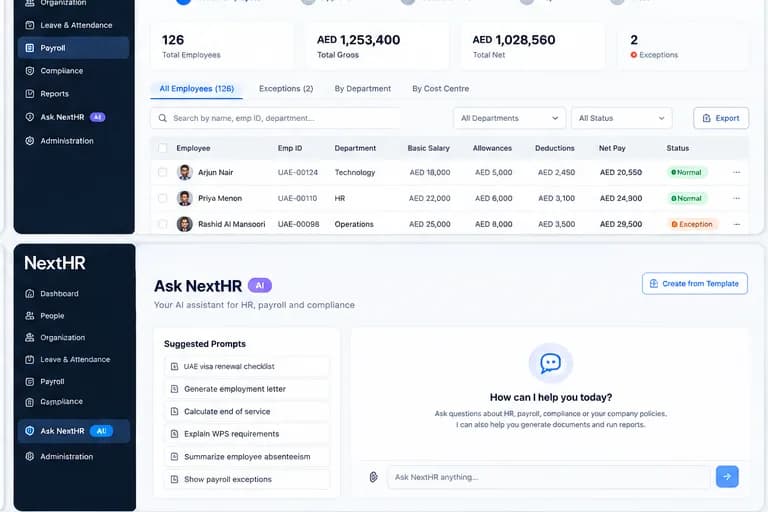
Run payroll across multiple GCC countries with local compliance built in — per entity, not one-size-fits-all.
Payroll Calculation
Accurate gross-to-net calculations with all applicable allowances, deductions, statutory contributions and cost elements per entity.
Multi-Country Payroll
Run payroll for entities in UAE, Saudi Arabia, Qatar, Oman, Bahrain and Kuwait from one platform. Each entity follows its own country rules.
UAE WPS SIF Generation
Generate UAE Wage Protection System SIF files in the correct MOHRE format. Submit through your WPS-registered bank or approved agent.
GOSI & Social Insurance
Automatic GOSI contribution calculations for Saudi Arabia entities. Social insurance for Qatar (GRSIA), Oman (PASI), Bahrain (SIO) and Kuwait (PIFSS) configured per entity.
End-of-Service Gratuity
Automatic EOS gratuity calculation per country: UAE (21 days/year first 5 years, 30 days after), Saudi Labour Law, and other GCC statutory calculations.
Payroll Reports
Payroll summaries, payroll cost analysis, variance reports, regulatory payroll reports and payslip generation — per entity or consolidated.
Approval Workflow
Multi-level payroll approval before finalisation. Payroll reviewers check calculations before submission. Payroll is locked after approval to prevent unauthorised changes.
Payroll Configuration
Configurable earning types, deduction categories, allowance structures, pay frequency and cost-centre allocation — per entity.
How it works
From payroll configuration to finalised payslips
Configure entity payroll
Set up your entity: pay frequency, currency, earning types, deduction rules, and which statutory contributions apply (WPS, GOSI, PASI, etc.).
Import / review pay data
Pull in attendance data and any one-time adjustments. Review the payroll input register before running calculations.
Run payroll calculations
NextHR calculates gross-to-net for every employee — applying all earnings, deductions, contributions and statutory rules for that entity.
Payroll review & approval
Payroll is submitted for approval. Reviewers check the payroll register and exception reports before giving final sign-off.
Generate WPS SIF / reports
Once approved: generate the WPS SIF file for UAE, payroll reports for finance and payslips for distribution via employee self-service.
Finalise and close period
Lock the payroll period. All records are archived for audit. EOS provisions and leave balances update for the next cycle.
Key benefits
What you get with NextHR
- Multi-country payroll from a single platform
- UAE WPS SIF generation in MOHRE-approved format
- GOSI contribution management for Saudi Arabia entities
- End-of-service gratuity under UAE, Saudi and other GCC labour laws
- Multi-currency payroll with exchange rate configuration
- Payroll approval workflow before finalisation
- Payslip generation via employee self-service
- Payroll cost analysis and variance reporting
Built for the GCC
GCC payroll is not uniform. WPS requirements in the UAE, GOSI rules in Saudi Arabia, GRSIA in Qatar, PASI in Oman, SIO in Bahrain and PIFSS in Kuwait each have different contribution rates, reporting formats and deadlines. NextHR handles this per entity — you configure once, the platform applies the correct rules. Payroll availability and specific statutory rates should always be verified with qualified in-country advisers before processing.
FAQ
Frequently asked questions
How does UAE WPS work in NextHR?
NextHR generates a WPS SIF (Salary Information File) in the MOHRE-required format once payroll is approved. You download the SIF file and submit it through your WPS-registered bank or approved WPS agent. NextHR does not connect directly to the bank — the SIF file is your submission artefact. Always verify the SIF format with your bank before the first submission.
How is end-of-service gratuity calculated for UAE?
Under UAE Federal Decree-Law No. 33 of 2021: employees with 1–5 years service are entitled to 21 calendar days of basic salary per year. For service beyond 5 years, 30 days of basic salary per year. NextHR calculates this automatically based on basic salary and service length. Capping and other rules apply — always verify with a UAE employment adviser.
Does NextHR handle GOSI contributions for Saudi Arabia?
NextHR calculates GOSI contributions as part of Saudi payroll. Saudi national contribution rates and non-Saudi rates differ. The platform is configured with standard contribution rates — always verify current GOSI rates with the General Organisation for Social Insurance before your first payroll run.
What payroll editions are available?
Payroll is included in the NextHR Professional edition. The Basic edition includes HR, leave and document management. Contact the NextHR team to understand which edition is right for your business.
Can NextHR run payroll for employees in multiple currencies?
Yes. Each entity is configured with its primary payroll currency (AED for UAE, SAR for Saudi Arabia, QAR for Qatar, etc.). Multi-currency payroll is supported for businesses operating across GCC entities.
Related modules
Ready to get started?
Explore GCC Payroll Processing as part of the complete NextHR platform.