
Platform — Leave & Attendance
Leave & Attendance Management
Manage employee leave requests, balances, attendance records and approval workflows — with GCC country-specific leave types, statutory entitlements and public holidays built in per entity.
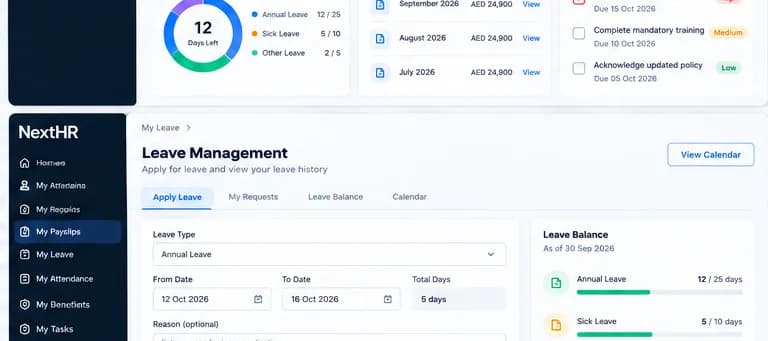
Country-aware leave policies, balances, approvals and GCC public holiday calendars — all in one place.
Leave Types
Configure all statutory GCC leave types: annual, sick, maternity, Hajj/pilgrimage, bereavement and study leave — each with country-specific entitlements.
Approval Workflows
Multi-level leave approval with email notifications and manager escalation. Approval chains configurable per entity and department.
Attendance Tracking
Employee attendance records, work schedules and timesheet management linked to leave balances and payroll.
GCC Public Holidays
Public holiday calendars for all six GCC countries — including national days and Islamic holidays — updated each year.
Leave Policies
Configurable leave policies per entity with accrual rules, carry-over limits, minimum notice periods and encashment settings.
Leave Reports
Leave utilisation, remaining balances, team availability and compliance reports by department, entity and country.
Team Calendar
Team-level leave calendar view so managers can see upcoming absences and plan workload before approving requests.
Balance Alerts
Automatic alerts when employees approach maximum carry-over limits or have unused leave before year-end.
How it works
From leave request to payroll integration
Configure leave policies
Set up leave types, annual entitlements, accrual rules and public holiday calendars per entity. UAE entities default to UAE Labour Law leave types.
Employee submits request
Employee submits a leave request via the self-service portal, selecting leave type, dates and adding a reason if required.
Manager reviews
The designated manager receives a notification, checks the team calendar for conflicts and approves or rejects with a comment.
Balance updated
Once approved, the leave balance is updated automatically. Employees can see their remaining entitlement in self-service.
Attendance record updated
Approved leave days are recorded against the employee attendance schedule.
Payroll picks up leave data
At payroll processing, leave without pay or encashment is factored in automatically based on the approved leave records.
Key benefits
What you get with NextHR
- GCC public holiday calendars for all six countries
- UAE statutory leave types: annual (30 days), sick, maternity, Hajj, bereavement, study
- Country-specific leave entitlements configured per entity
- Online leave requests with configurable approval workflow
- Leave balance tracking and accrual rules
- Team calendar view for workload planning
- Attendance schedules and timesheet management
- Leave integration with payroll for accurate deductions
Built for the GCC
UAE Labour Law mandates six leave types: Annual Leave (30 days after one year), Sick Leave (15 days full pay, 30 days half pay, 45 days unpaid), Maternity Leave, Hajj/Pilgrimage Leave (once per service), Bereavement Leave and Study Leave. Saudi Arabia and other GCC countries have their own entitlements. NextHR lets you configure the correct leave types per entity so the right rules apply to the right employees. Public holiday calendars update annually — Islamic holidays are subject to moon sighting confirmation.
FAQ
Frequently asked questions
What leave types does UAE Labour Law require?
UAE Federal Decree-Law No. 33 of 2021 provides for: Annual Leave (30 days after one year, 2 days/month for 6-12 months service), Sick Leave (15 days full, 30 days half, 45 days unpaid per year), Maternity Leave (60 days), Hajj Leave (30 days, once per service), Bereavement Leave (5 days for spouse/child; 3 days for parent/sibling), and Study Leave. NextHR includes all six leave types for UAE entities. Always verify current requirements with a UAE employment adviser.
How are leave balances calculated?
Leave balances accrue based on the policy configured for each leave type and entity. Annual leave typically accrues monthly. When a leave request is approved, the balance is reduced. Year-end carry-over and encashment rules are configurable per policy.
Can managers see the team calendar before approving?
Yes. When a manager receives a leave approval request, they can view the team leave calendar to check for scheduling conflicts before approving or rejecting.
Does leave integrate with payroll?
Yes. Approved leave records feed into the payroll calculation. Leave without pay reduces the employee salary for the relevant period. Annual leave encashment on termination is calculated from the approved leave balance at the time of the final payroll run.
How do Islamic public holidays work?
GCC Islamic holidays are subject to moon sighting confirmation and are not fixed calendar dates. NextHR maintains public holiday calendars that are updated when official announcements are made. Administrators can also manually adjust holidays for their entity's calendar.
Related modules
Ready to get started?
Explore Leave & Attendance Management as part of the complete NextHR platform.