
Platform — Reporting
Reporting & Analytics
Real-time workforce reports, payroll analytics, leave utilisation, nationalization dashboards and compliance reporting — across all your GCC entities from a single reporting view.
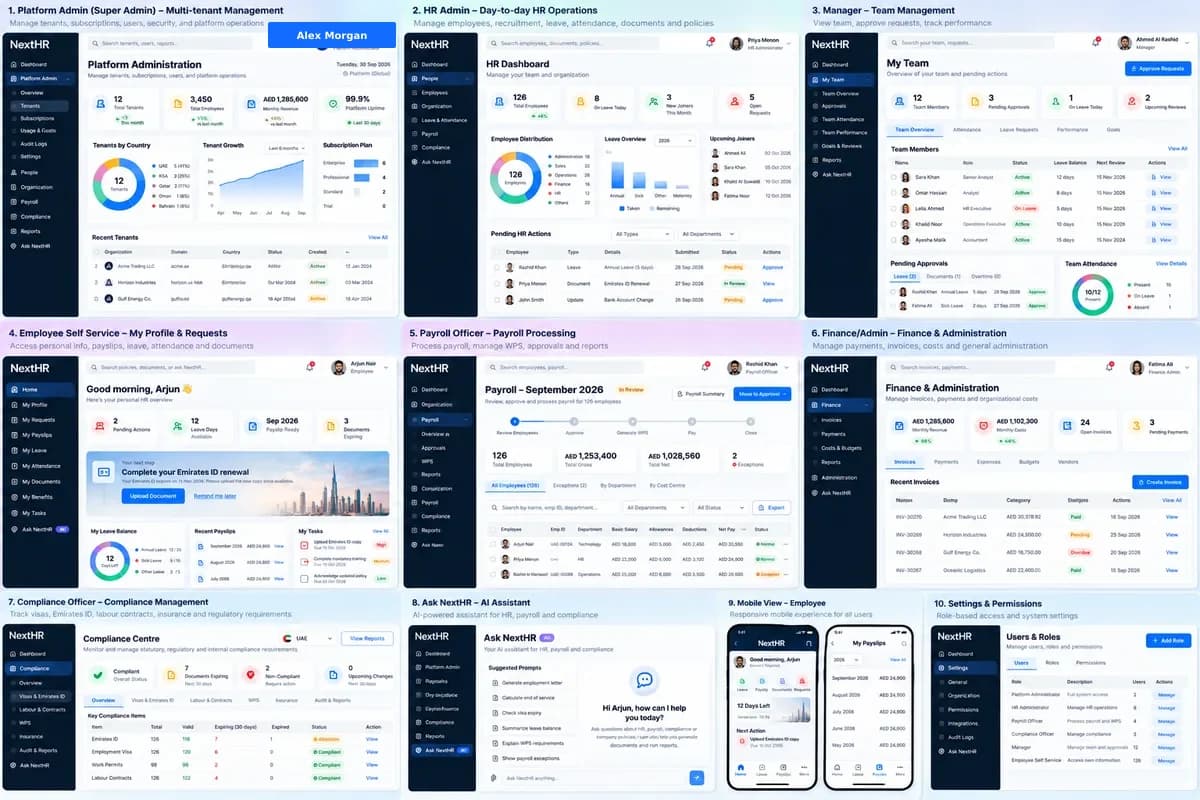
Turn your GCC HR data into clear, actionable insights — across all entities, in real time.
Workforce Reports
Headcount by entity, department, nationality and job grade. Turnover analysis, new hire trends and workforce composition reports.
Payroll Analytics
Payroll cost by entity, department and cost centre. Period-over-period variance analysis and payroll summary reports.
Leave & Attendance
Leave utilisation by type and team, remaining balances, absence trends and attendance compliance reports.
Nationalization Reports
Emiratisation, Saudisation (Nitaqat), Omanisation and other GCC national ratio dashboards — updated in real time from HR data.
Compliance Dashboards
Visa expiry status, document expiry tracking, probation period monitoring and other compliance metrics in one dashboard.
Standard Report Library
15+ standard reports covering workforce, payroll, leave, compliance and EOS provisions — available out of the box.
Custom Reports
Build and save custom reports by selecting fields, filters and groupings. Export to Excel or PDF for distribution.
Multi-Entity Consolidation
Consolidated view across all GCC entities — compare headcount, payroll costs and compliance metrics across UAE, Saudi, Qatar and beyond.
How it works
From HR data to boardroom insight
HR data entered and maintained
Employee records, payroll runs, leave approvals and document updates all feed into the reporting layer automatically — no separate data entry.
Standard reports available
15+ pre-built reports are available immediately. Workforce headcount, payroll summary, leave utilisation and nationalization ratios are always current.
Filter and segment
Apply filters by entity, department, date range, nationality or job grade to focus reports on the data you need.
Build custom reports
Use the report builder to create custom views. Select fields, group by dimensions and apply conditions. Save custom reports for regular use.
Export for distribution
Export any report to Excel or PDF. Share with finance, management or the board with the confidence that data is current.
Monitor compliance in real time
Visa expiry dashboards and nationalization ratio monitors update in real time. Act on exceptions before they become compliance failures.
Key benefits
What you get with NextHR
- 15+ standard reports available out of the box
- Real-time nationalization ratio dashboards (Emiratisation, Saudisation, Omanisation)
- Consolidated multi-entity view across all GCC operations
- Payroll cost and variance analysis by entity and department
- Leave utilisation and attendance reports
- Visa and document expiry compliance dashboards
- Custom report builder with save and re-run
- Export to Excel and PDF
Built for the GCC
GCC businesses operate across multiple countries, each with its own nationalization targets, visa compliance requirements and payroll rules. Consolidated reporting that respects these differences — showing UAE Emiratisation ratios alongside KSA Nitaqat bands alongside Qatar workforce data — is a GCC-specific requirement that generic HR systems do not handle well. NextHR reporting is built around multi-entity, multi-country GCC operations.
FAQ
Frequently asked questions
What standard reports does NextHR include?
NextHR includes 15+ standard reports covering: workforce headcount (by entity, dept, nationality, grade), payroll summary, payroll cost by cost centre, leave utilisation by type, leave balance, Emiratisation ratio, Saudisation (Nitaqat) ratio, visa expiry status, document expiry, end-of-service provision, turnover rate, and new hire report. Additional standard reports are added with platform updates.
Can I build my own reports?
Yes. The custom report builder lets you select the data fields, apply filters (by entity, date range, department, etc.), group by dimensions and sort the output. Custom reports can be saved and re-run on demand, or exported to Excel for further analysis.
How are nationalization ratios calculated?
Nationalization ratios are calculated in real time from the employee records in NextHR. For UAE Emiratisation: UAE national employees divided by total headcount per entity. For Saudi Arabia Saudisation: the Nitaqat band calculation uses Saudi national headcount against total. The exact threshold requirements vary by business activity and size — the dashboards show your current ratio; you verify compliance thresholds with MOHRE or HRSD.
Can I see consolidated data across all my GCC entities?
Yes. The multi-entity view consolidates headcount, payroll costs and key metrics across all GCC entities into one summary. You can also drill into any individual entity for entity-specific reports.
How current is the data in reports?
Reports pull from live HR data. Headcount, leave balances and compliance metrics update in real time as records are updated. Payroll reports are current as of the last finalised payroll run.
Ready to get started?
Explore Reporting & Analytics as part of the complete NextHR platform.